
Display rules configuration
The resources/display_rules.yaml file is the heart of HERITRACE’s user interface customization. It allows you to control how data is presented and handled without touching a single line of code. This configuration determines how different types of entities are displayed, what properties are visible, and how forms behave for creating and editing data.
In short, this file lets you transform raw RDF data into a user-friendly and intuitive experience for domain experts.
File location
Section titled “File location”By default, the display rules file is resources/display_rules.yaml in the project’s root directory. You can change this path in your config.py file:
DISPLAY_RULES_PATH = 'resources/display_rules.yaml'Core concepts
Section titled “Core concepts”The configuration is a list of rules. Each rule targets a specific type of entity and defines how it and its properties should be handled.
Targeting entities
Section titled “Targeting entities”You can target entities with rules in three ways, allowing for granular control.
You can target all entities of a specific RDF class.
# Targets all entities that are a fabio:JournalArticle- target: class: "http://purl.org/spar/fabio/JournalArticle" # ... other settingsYou can target entities that conform to a specific SHACL shape. This is useful for distinguishing between entities of the same class that have different characteristics (e.g., a standard issue vs. a special issue).
# Targets all entities that conform to SpecialIssueShape- target: shape: "http://schema.org/SpecialIssueShape" # ... other settingsFor maximum precision, you can target entities that belong to a specific class AND conform to a specific shape.
# Targets entities that are a fabio:JournalIssue AND conform to RegularIssueShape- target: class: "http://purl.org/spar/fabio/JournalIssue" shape: "http://schema.org/RegularIssueShape" # ... other settingsWhen an entity could be targeted by multiple rules (e.g., it has multiple types), the rule with the lower priority number is applied.
- target: class: "http://purl.org/spar/fabio/JournalArticle" priority: 1 # Higher priority # ...- target: class: "http://purl.org/spar/fabio/Expression" priority: 2 # Lower priority # ...Key rule settings
Section titled “Key rule settings”Here are the top-level settings for each rule, listed in order of how they are presented in this documentation:
displayName: A human-readable name for the entity type (e.g., “Journal Article”). This is shown in the UI.shouldBeDisplayed: A boolean (trueorfalse). Iftrue, this entity type will appear in the catalogue and can be created via the “New Record” interface.fetchUriDisplay: A SPARQL query that creates a user-friendly label for an entity. This is crucial for usability, as it replaces technical URIs with meaningful text. See the Displaying entity labels section for details.displayProperties: A list defining how each property of the entity should be displayed and behave. See the Configuring properties section for details.sortableBy: A list of properties that users can use to sort items in the catalogue view. See the Sorting catalogue items section for details.similarity_properties: A configuration that defines which properties are used to identify potential duplicate entities. HERITRACE uses these to display “Similar Resources” on entity pages, enabling users to merge duplicates. See the Similarity properties for duplicate detection section for details.
Displaying entity labels with fetchUriDisplay
Section titled “Displaying entity labels with fetchUriDisplay”While URIs are great for machines, they are not user-friendly. The fetchUriDisplay setting allows you to define a human-readable label for an entity type using a SPARQL query. This label is used throughout the HERITRACE interface, for instance, in search results and breadcrumbs, to represent the entity.
The query uses [[uri]] as a placeholder, which HERITRACE dynamically replaces with the URI of the entity being displayed.
Your SPARQL query for fetchUriDisplay must SELECT a single variable. This variable holds the final formatted string that will be shown to the user.
You can find many practical examples of this in the default resources/display_rules.yaml file.
# Example for a Journal Volume- target: class: "http://purl.org/spar/fabio/JournalVolume" fetchUriDisplay: | PREFIX fabio: <http://purl.org/spar/fabio/> PREFIX frbr: <http://purl.org/vocab/frbr/core#> PREFIX dcterms: <http://purl.org/dc/terms/> SELECT ?display WHERE { [[uri]] fabio:hasSequenceIdentifier ?number ; frbr:partOf ?journal . ?journal dcterms:title ?journalTitle . BIND(CONCAT("Volume ", ?number, " of ", ?journalTitle) AS ?display) }This configuration takes a JournalVolume entity and displays it as “Volume [number] of [Journal Title]”, which is much clearer than its URI.
Configuring properties (displayProperties)
Section titled “Configuring properties (displayProperties)”This is where you define the behavior of each field in the entity view and edit forms.
Basic property
Section titled “Basic property”A simple property configuration might look like this:
- property: "http://purl.org/dc/terms/title" displayName: "Title" shouldBeDisplayed: true inputType: "textarea"property: The URI of the RDF property.displayName: The label shown in the UI.shouldBeDisplayed: Iftrue, the property is visible.inputType: Defines the form field. Common types includetext,textarea,date, andtag.
Search and disambiguation
Section titled “Search and disambiguation”You can enable real-time search to prevent duplicate entries.
- property: "http://purl.org/dc/terms/title" displayName: "Title" supportsSearch: true minCharsForSearch: 3 searchTarget: "self"supportsSearch: Set totrueto enable search-as-you-type.minCharsForSearch: The number of characters a user must type before the search is triggered.searchTarget:self: Searches for entities of the same type with a matching property value (e.g., finding other articles with a similar title).parent: Use this when a property links to a separate but related entity. This setting ensures that a search for the related entity’s value returns the main (parent) entity. For example, if a bibliographic resource is linked to anIdentifierentity (which holds a DOI), a search for the DOI value should return the resource itself, not theIdentifierentity.
Custom value display with fetchValueFromQuery
Section titled “Custom value display with fetchValueFromQuery”Sometimes, a property’s value is not a simple literal but another entity that needs a formatted display. For this, you can use fetchValueFromQuery.
The provided SPARQL query must SELECT two variables in a specific order: first, the formatted string to display in the UI, and second, the URI of the linked entity.
For example, an identifier is an entity itself, but we want to display it as doi:10.1234/567.
- property: "http://purl.org/spar/datacite/hasIdentifier" displayName: "Identifier" fetchValueFromQuery: | PREFIX datacite: <http://purl.org/spar/datacite/> PREFIX literal: <http://www.essepuntato.it/2010/06/literalreification/> SELECT (CONCAT(STRAFTER(STR(?scheme), "http://purl.org/spar/datacite/"), ":", ?literal) AS ?id) ?identifier WHERE { [[subject]] datacite:hasIdentifier ?identifier. VALUES (?identifier) {([[value]])} ?identifier datacite:usesIdentifierScheme ?scheme; literal:hasLiteralValue ?literal. }Ordering items (orderedBy)
Section titled “Ordering items (orderedBy)”When the order of multiple values for a property is significant (e.g., the sequence of authors for a paper), you can use the orderedBy key. It specifies the RDF predicate that defines this order. When orderedBy is configured, the interface will display drag-and-drop handles, allowing users to reorder the items manually.
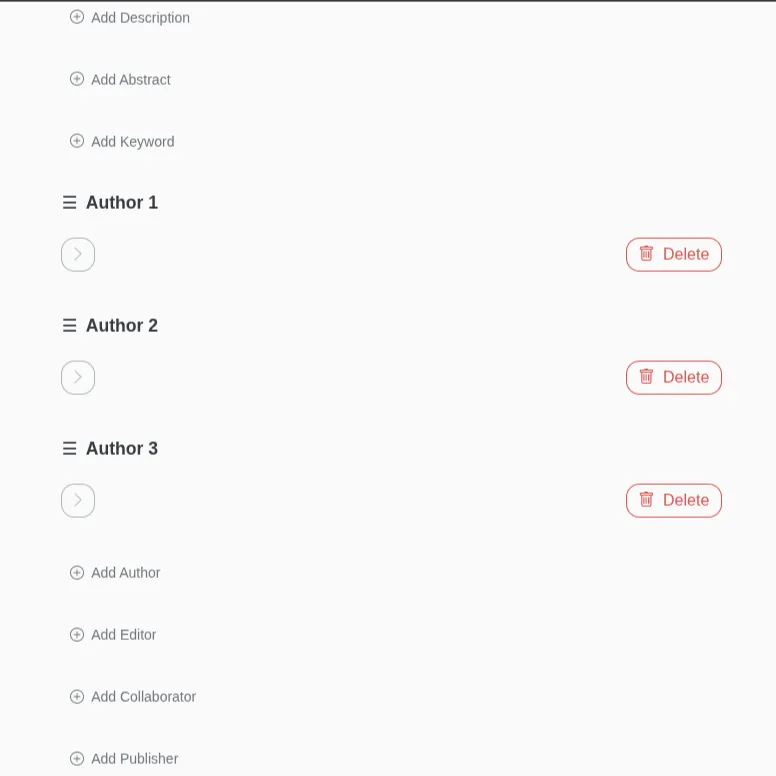
- property: "http://purl.org/spar/pro/isDocumentContextFor" orderedBy: "https://w3id.org/oc/ontology/hasNext" # ... other settingsHow it works: RDF representation
Section titled “How it works: RDF representation”When a user arranges items, HERITRACE uses the specified orderedBy property to create a linked list that connects the items sequentially. This approach is model-agnostic; it can order any set of related resources, whether they are direct properties or linked through an intermediate proxy entity.
For instance, if a resource has multiple related items and their order matters, the RDF structure would look like this:
@prefix ex: <http://example.org/ontology/> .@prefix : <http://example.org/instance/> .
# :myResource is linked to three items.# The order in this triple declaration is not significant.:myResource ex:hasItem :item1, :item2, :item3 .
# The 'orderedBy' property (ex:hasNext) creates a chain.:item1 ex:hasNext :item2 .:item2 ex:hasNext :item3 .
# :item3 has no ex:hasNext, marking it as the end of the list.Relationship properties (proxy pattern)
Section titled “Relationship properties (proxy pattern)”Sometimes a simple link between two entities isn’t enough. You might need to describe the relationship itself. For example, a person can be an author of an article, but they could also be an editor. How do you capture this specific role?
This is solved with a Proxy Pattern, which uses an intermediate entity to hold the properties of the relationship.
The data model looks like this:
Journal Article → isDocumentContextFor → Role In Time → isHeldBy → Person
The Role In Time entity is the “proxy.” It holds the details, like the specific role (pro:author or pro:editor).
Here is how you configure this complex relationship in display_rules.yaml:
- property: "http://purl.org/spar/pro/isDocumentContextFor" orderedBy: "https://w3id.org/oc/ontology/hasNext" # Optional: property to sort items intermediateRelation: class: "http://purl.org/spar/pro/RoleInTime" targetEntityType: "http://xmlns.com/foaf/0.1/Agent" displayRules: - shape: "http://schema.org/AuthorShape" displayName: "Author" fetchValueFromQuery: | # This query's context is the proxy entity. # It gets the name of the final target entity (the Agent). PREFIX pro: <http://purl.org/spar/pro/> PREFIX foaf: <http://xmlns.com/foaf/0.1/> SELECT DISTINCT ?formattedName ?ra WHERE { # [[value]] is the URI of the RoleInTime entity [[value]] pro:isHeldBy ?ra; pro:withRole pro:author. ?ra foaf:name ?formattedName. } - shape: "http://schema.org/EditorShape" displayName: "Editor" fetchValueFromQuery: | # A similar query for editors...Breaking down the configuration:
property: The property on the source entity (Journal Article) that points to the proxy entities.orderedBy: (Optional) Specifies a property used to create an ordered sequence between the proxy entities, ensuring they are displayed in the correct order (e.g., for a list of authors). WhenorderedByis used, HERITRACE displays drag-and-drop handles next to each item, allowing users to reorder them manually.intermediateRelation: This is the core of the proxy configuration.class: Therdf:typeof the proxy entity (pro:RoleInTime).targetEntityType: Therdf:typeof the final entity you want to link to (foaf:Agent). HERITRACE uses this to know what kind of entity to create or search for.
displayRules: A list that allows you to handle different kinds of relationships managed under the same mainproperty.shape: HERITRACE uses the SHACL shape of the proxy entity to distinguish between roles. For example, both authors and editors arepro:RoleInTimeentities, but they conform to different shapes (AuthorShape,EditorShape).displayName: A clean label for the UI (“Author”, “Editor”).fetchValueFromQuery: A SPARQL query to get the display text. Important: The context for this query ([[value]]) is the proxy entity’s URI. The query must navigate from the proxy to the final target to get its name.
This configuration tells HERITRACE how to navigate the proxy relationship, distinguish between different roles using SHACL shapes, and display the final linked entity correctly in the user interface.
Sorting catalogue items (sortableBy)
Section titled “Sorting catalogue items (sortableBy)”The sortableBy configuration allows users to sort entities in the catalogue view by specific properties. When configured, sorting controls appear in the catalogue and time vault interfaces, letting users organize items by properties like title, publication date, or any other relevant field.
Basic configuration
Section titled “Basic configuration”- target: class: "http://purl.org/spar/fabio/JournalArticle" displayName: "Journal Article" sortableBy: - property: "http://purl.org/dc/terms/title" sortOrder: ["asc", "desc"] - property: "http://prismstandard.org/namespaces/basic/2.0/publicationDate" sortOrder: ["desc", "asc"]Configuration options:
property: The URI of the property to sort bysortOrder: An array defining available sort directions. The first value is the default."asc": Ascending order (A-Z, 0-9, oldest-newest)"desc": Descending order (Z-A, 9-0, newest-oldest)
Similarity properties for duplicate detection
Section titled “Similarity properties for duplicate detection”The similarity_properties configuration enables HERITRACE to identify potential duplicates when users create or view entities. When configured, the system automatically searches for similar resources based on matching property values and displays them in the “Similar Resources” section on entity pages, where users can initiate merge operations.
How similarity detection works
Section titled “How similarity detection works”HERITRACE queries the triplestore to find other entities of the same type that share matching values for the configured properties. The configuration supports flexible boolean logic combining OR and AND conditions.
Basic configuration
Section titled “Basic configuration”The simplest configuration uses OR logic: entities are considered similar if they match on any of the specified properties.
- target: class: "http://purl.org/spar/fabio/JournalArticle" displayName: "Journal Article" similarity_properties: - "http://purl.org/dc/terms/title" - "http://purl.org/spar/datacite/hasIdentifier"This configuration finds articles that share either the same title or the same identifier. For instance, if a user views an article titled “Machine Learning Applications”, HERITRACE will find other articles with that exact title or with matching identifiers.
AND logic for stricter matching
Section titled “AND logic for stricter matching”For more precise duplicate detection, you can require that multiple properties match simultaneously using AND logic.
- target: class: "http://purl.org/spar/fabio/JournalIssue" displayName: "Journal Issue" similarity_properties: - and: - "http://purl.org/spar/fabio/hasSequenceIdentifier" - "http://purl.org/vocab/frbr/core#partOf"This configuration only considers issues as similar if they have both the same sequence identifier (e.g., issue number) and belong to the same journal. This prevents false positives where different journals might use the same issue numbering scheme.
Complex matching with combined logic
Section titled “Complex matching with combined logic”You can combine OR and AND logic.
- target: class: "http://xmlns.com/foaf/0.1/Agent" displayName: "Agent" similarity_properties: - "http://xmlns.com/foaf/0.1/name" - and: - "http://xmlns.com/foaf/0.1/familyName" - "http://xmlns.com/foaf/0.1/givenName" - "http://purl.org/spar/datacite/hasIdentifier"This configuration for agents (people or organizations) considers entities similar if they match on:
- The same full name (
foaf:name), OR - Both the same family name AND given name, OR
- The same identifier (e.g., ORCID)
Best practice: keep it DRY with YAML anchors
Section titled “Best practice: keep it DRY with YAML anchors”To avoid repeating the same queries or property definitions, use YAML anchors (&) and aliases (*). This makes your configuration file shorter and much easier to maintain.
# 1. Define reusable queries and properties at the topqueries:  author_query: &author_query |    PREFIX pro: <http://purl.org/spar/pro/>    PREFIX foaf: <http://xmlns.com/foaf/0.1/>    SELECT DISTINCT ?formattedName ?ra WHERE {      [[value]] pro:isHeldBy ?ra;          pro:withRole pro:author.      ?ra foaf:name ?formattedName.    }
common_properties:  title_property: &title_property    property: "http://purl.org/dc/terms/title"    displayName: "Title"    shouldBeDisplayed: true    inputType: "textarea"    supportsSearch: true
# 2. Use aliases in your rulesrules:  - target:      class: "http://purl.org/spar/fabio/JournalArticle"    displayProperties:      - *title_property # Use the title property definition      - property: "http://purl.org/spar/pro/isDocumentContextFor"        displayRules:          - shape: "http://schema.org/AuthorShape"            displayName: "Author"            fetchValueFromQuery: *author_query # Use the author query
Virtual properties: Bridging user mental models and data models
Section titled “Virtual properties: Bridging user mental models and data models”Sometimes, the way data is structured in your RDF ontology doesn’t align with how users naturally think about it. Virtual properties are HERITRACE’s solution to this mismatch, allowing you to present data in a way that matches users’ mental models while maintaining the integrity of your underlying data model.
The problem: Ontological vs. intuitive representation
Section titled “The problem: Ontological vs. intuitive representation”Consider citations. In the CITO ontology, a citation is modeled as a first-class entity (a cito:Citation class) that links two bibliographic resources:
:citation1 a cito:Citation ; cito:hasCitingEntity :articleA ; cito:hasCitedEntity :articleB .This is ontologically sound and enables rich metadata about citations (citation type, semantics, etc.). However, most users think of citations as relationships, not entities. When editing an article, users expect to simply “add a citation” to another resource, not “create a Citation entity that links this article to another resource.”
The solution: Virtual properties
Section titled “The solution: Virtual properties”Virtual properties let you hide the complexity of the underlying data model and present a simpler, more intuitive interface. When a user adds a value to a virtual property, HERITRACE automatically creates and manages the intermediate entities behind the scenes.
For the citation example, you can configure:
- A “Citations” virtual property that appears as a simple relationship field
- When the user adds a citation, HERITRACE creates the
Citationentity automatically - The user never sees or manages the
Citationentity directly
You can even show both directions of the relationship (“Citations” and “Is Cited By”) as separate virtual properties, even though they’re backed by the same set of Citation entities in the graph.
Learn more
Section titled “Learn more”For detailed configuration instructions, complete examples, and best practices, see the Virtual properties configuration guide.
Testing your rules
Section titled “Testing your rules”When running HERITRACE in development mode, any changes to resources/display_rules.yaml will automatically restart the server, so you can see your updates instantly.