
Merging resources
When two resources describe the same thing, you can merge them into one.
How HERITRACE finds duplicates
Section titled “How HERITRACE finds duplicates”HERITRACE looks for resources of the same type that share some details, such as the title, an identifier or the name of a person. It lists them as possible duplicates; you decide whether they really are.
Step 1: start the merge
Section titled “Step 1: start the merge”Open the page of the resource you want to keep.
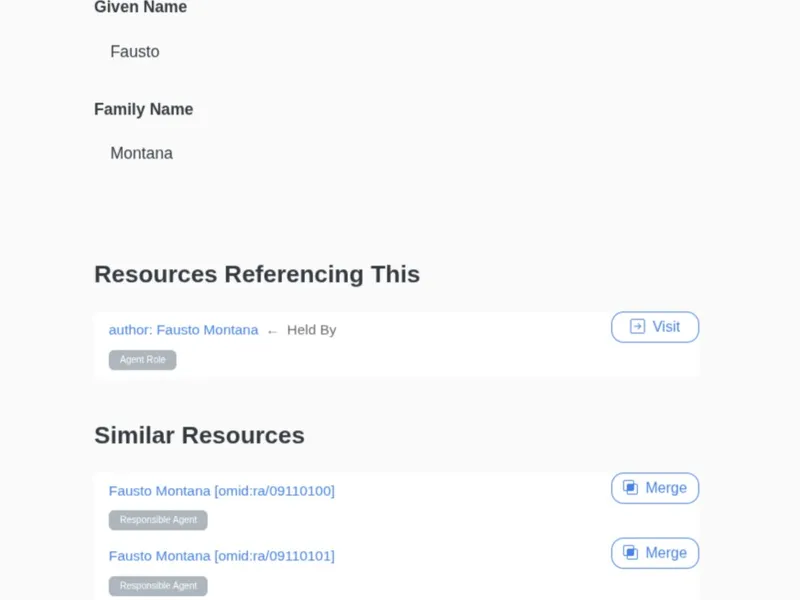
- Scroll down to the Similar resources section at the bottom of the page.
- Find the resource you want to merge into the one you are viewing.
- Click Merge next to it.
Step 2: check what will happen
Section titled “Step 2: check what will happen”A confirmation page summarises the merge.
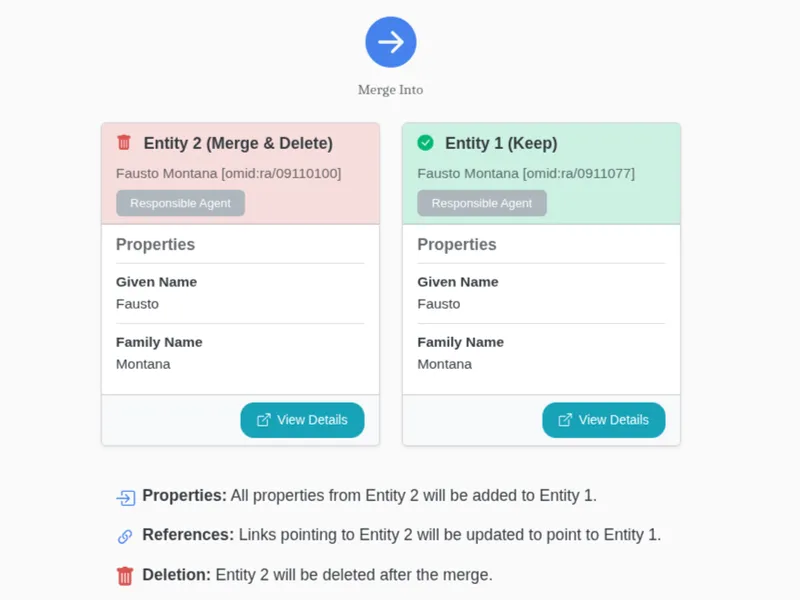
It shows two boxes:
- Merge and delete: the resource you chose from the Similar resources list, which will be deleted.
- Keep: the resource whose page you started from, which will remain and receive the information of the other.
Below the boxes, the page explains what the merge does:
- all the information of the resource to delete is added to the one you keep;
- links from other resources to the deleted one now point to the one you keep;
- only the resource you keep remains.
Step 3: confirm
Section titled “Step 3: confirm”Click Confirm merge.