Benchmarks
This project includes benchmarks to measure how parallelism affects query execution time on Virtuoso.
What the benchmarks test
Section titled “What the benchmarks test”The benchmark suite executes a fixed number of SPARQL queries (1000) and measures the total time to complete them with varying levels of parallelism.
Four query types are tested:
- SPO queries: retrieve all triples for a given subject URI
- DOI lookups: find bibliographic resources by DOI identifier
- VVI queries: venue-volume-issue hierarchical lookups
- Mixed workload: combination of all three query types
Parallelism levels scale with the number of CPU cores: 1 (sequential), 25%, 50%, 75%, and 100% of available cores.
Results
Section titled “Results”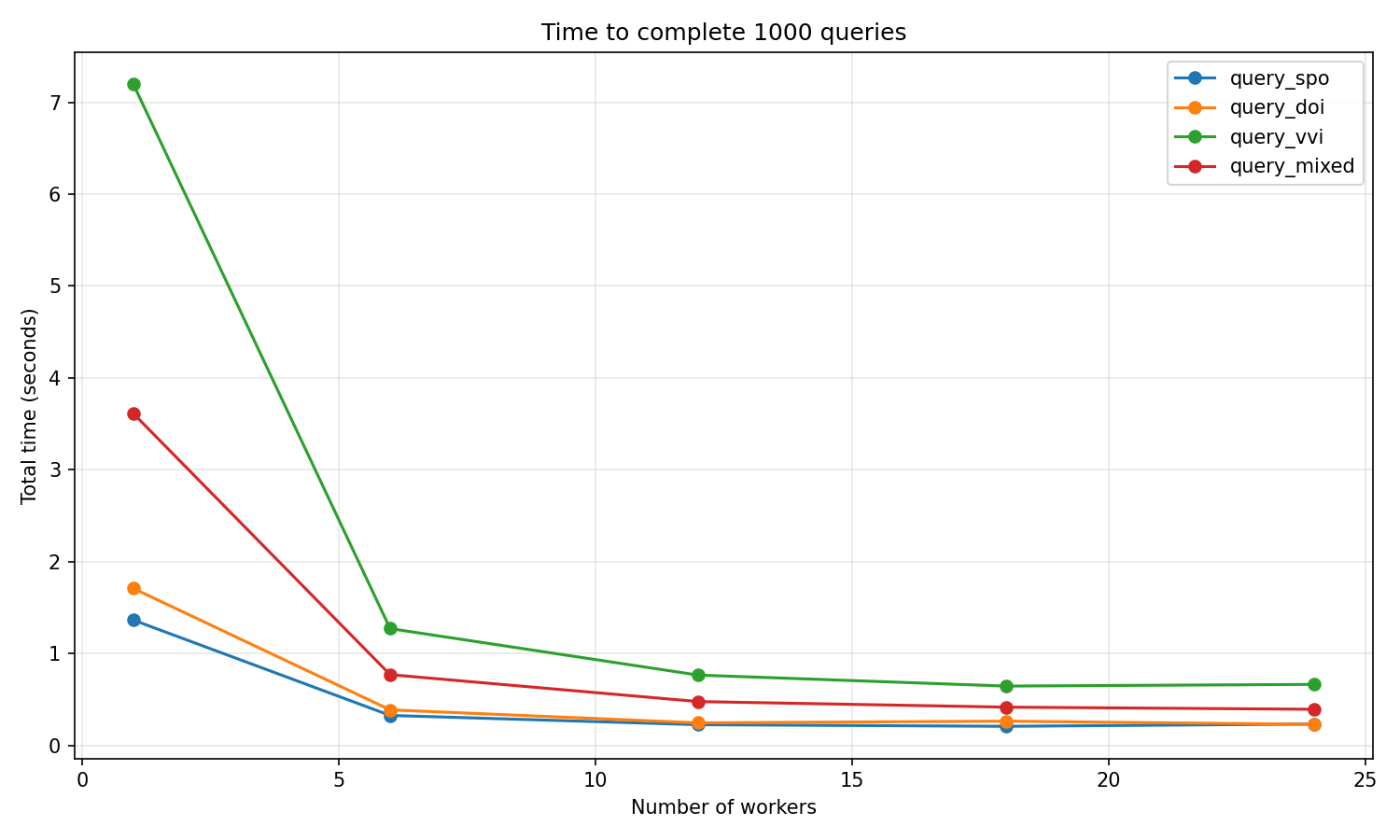
The graph shows the total time to complete 1000 queries at different parallelism levels. Key observations:
- Sequential execution (1 worker) is significantly slower
- Performance improves dramatically with initial parallelization
- Beyond 25-50% of CPU cores, gains plateau due to database I/O bottleneck
Getting the test database
Section titled “Getting the test database”The benchmarks require a Virtuoso database with OpenCitations Meta data. You can download a complete database dump from Zenodo:
OpenCitations Meta database dump DOI: 10.5281/zenodo.15855112
The dump includes:
- 124.5 million bibliographic entities
- Full-text search indexing
- 41.7 GB total (38.82 GB compressed)
Download and extract
Section titled “Download and extract”- Download all four 7z archive parts from Zenodo
- Use the provided extraction script:
# Linux/macOSbash extract_archive.sh oc_meta_data_06_06.7z.001 ./virtuoso_data
# Windowsextract_archive.bat oc_meta_data_06_06.7z.001 .\virtuoso_data
Launch Virtuoso with the data
Section titled “Launch Virtuoso with the data”virtuoso-launch \ --name oc-meta-benchmark \ --memory 16g \ --mount-volume ./virtuoso_data:/database \ --http-port 18890 \ --detach \ --wait-readyRunning benchmarks
Section titled “Running benchmarks”Install dev dependencies and run:
uv sync --devuv run pytest tests/benchmarks/This automatically:
- Runs all benchmark tests
- Saves JSON results to
.benchmarks/ - Generates
benchmark_results/benchmark_results.png
Generated files
Section titled “Generated files”| File | Description |
|---|---|
.benchmarks/*.json | Raw benchmark data from pytest-benchmark |
benchmark_results/benchmark_results.png | Time vs parallelism chart |